
Threat Modeling a Web Application With STRIDE — My Step-by-Step Process

I’ve been doing threat models for years now, and the one thing that annoys me is how everyone teaches it differently. Some people make it sound like a PhD exercise. Others oversimplify it to “just think like an attacker.” Neither helps when you’re sitting in a room with developers who need to ship a feature next week.
So I’m going to walk through my actual process. Not the theory — you can read Microsoft’s STRIDE documentation or Adam Shostack’s book for that. This is what I do when someone says “can you threat model this service?”
I also published my practice threat models on GitHub — this post explains the thinking behind them.
Before I Touch Any Diagram
I have two mental checklists I run through before I start drawing anything. I’ve been using these long enough that they’re automatic now.
The first one is - For every component in the system, I ask:
- how is Authentication handled?
- What Authorization controls exist?
- Is there Auditing and logging?
- Is there Rate Limiting to prevent abuse?
- And what’s the Data Protection story — encryption in transit, at rest, key management?
That covers maybe 80% of the security surface. The remaining 20% is application-specific stuff — input validation, CORS, file upload restrictions, OWASP Top 10 patterns for web apps. And infrastructure-level questions like network segmentation, compute hardening, and how secrets are managed.
The second checklist is security principles: least privilege, defense in depth, secure by default, zero trust, separation of duties, auditability, fail-secure.
If a design violates any of these, that’s usually where the threat is hiding. For example, I reviewed a system once where a single API key gave read and write access to every customer’s data. That’s a least privilege violation, and the threat writes itself.
Step 1: Decompose and Draw the DFD
Four things to identify:
- external entities (users, third-party services)
- processes (your services)
- data stores (databases, caches), and
- data flows (how data moves between all of the above).
I drawn this one in Microsoft Threat Modeling Tool. But you can use draw.io or OWASP Threat Dragon. Doesn’t need to be perfect. For a web app with an API gateway, it looks roughly like this:
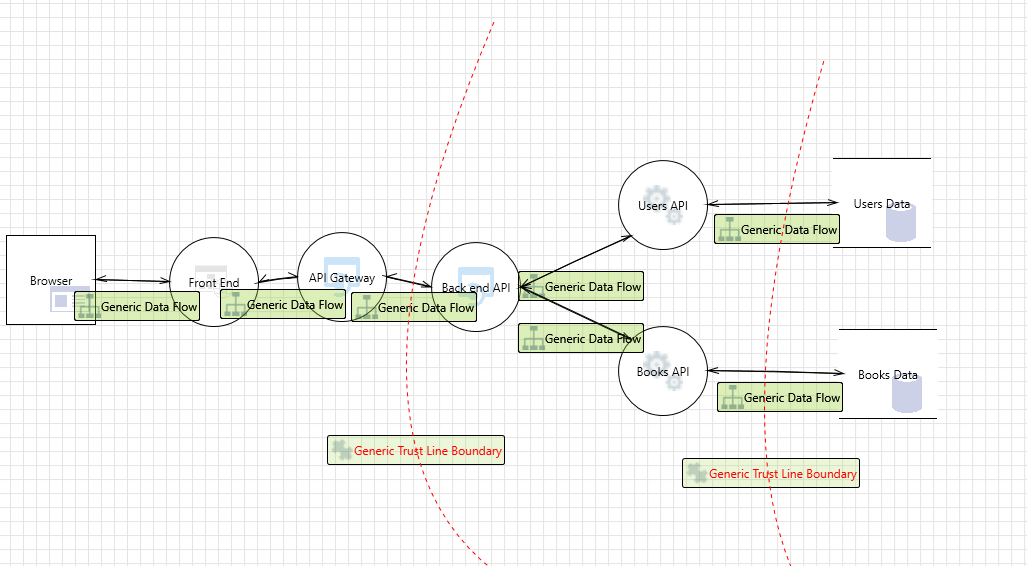
The part most people skip: trust boundaries. Draw lines where the trust level changes. Internet to your API gateway — that’s a trust boundary. API gateway to backend services — another one. Services to databases — another one. I’ve found that most threats cluster right at these boundaries.
If you’re short on time, just threat model the trust boundary crossings and you’ll catch the majority of issues.
Step 2: The STRIDE-Per-Element Matrix (My Quick Reference)
I keep this as a quick reference because it saves a lot of time. Not every STRIDE category applies to every DFD element, and I wasted time early in my career trying to force-fit categories where they don’t belong.
| S | T | R | I | D | E | |
|---|---|---|---|---|---|---|
| User (External Entity) | ✓ | ✓ | ||||
| Process | ✓ | ✓ | ✓ | ✓ | ✓ | ✓ |
| Data Store | ✓ | ✓ | ✓ | ✓ | ||
| Data Flow | ✓ | ✓ | ✓ |
Users can be spoofed and can repudiate actions — that’s it. Processes get hit with everything. Data stores can be tampered with, leaked, or overwhelmed, but you’re not going to “spoof” a database. Data flows can be intercepted (information disclosure), modified (tampering), or flooded (DoS).
When I’m analyzing a data flow between the API gateway and backend, I’m only thinking about tampering, information disclosure, and denial of service. I’m not wasting 10 minutes trying to come up with a spoofing scenario for a network connection. The matrix keeps me focused.
Step 3: Write Threats as Stories, Not Labels
This is the thing that changed how I do threat modeling. I used to write things like “IDOR vulnerability” or “improper access control” as threats. Completely useless. A developer reads that and has no idea what to fix.
Now I write every threat with three parts: attack vector, outcome, and motivation.
Instead of “IDOR,” I write: “Attacker changes the user_id parameter in the GET /api/users/{id}/profile request from their own ID to another user’s ID, gaining access to that user’s PII, because the backend doesn’t check if the authenticated user owns the requested resource.”
That’s specific enough that a developer can write the fix without asking me a single question.
Here’s another example — for a file upload feature, I’d write:
“Attacker uploads a PHP web shell disguised as a profile image to the file server, gaining persistent remote code execution, because the server doesn’t validate file content type beyond the extension.” — STRIDE: Elevation of Privilege. Severity: Critical.
“Attacker uploads a 10GB file repeatedly to exhaust disk space on the file server, causing denial of service for all users, because there’s no file size limit enforced server-side.” — STRIDE: DoS. Severity: High.
Compare that to “malicious file upload.” One tells you exactly what to test and fix. The other is a bullet point in a slide deck nobody reads.
Step 4: STRIDE Per Element vs STRIDE Per Interaction
Two ways to apply STRIDE. I use both depending on the architecture.
STRIDE Per Element: go through each component individually — user, API gateway, backend API, database — and check each applicable STRIDE category. I use this for simpler architectures where I want to go deep on individual components. My API threat model uses this approach.
STRIDE Per Interaction: go through each data flow between components — User → API Gateway, Gateway → Backend, Backend → Database — and check all six STRIDE categories on each flow. I use this for microservices where the risk is in how services talk to each other across trust boundaries. My web app threat model uses this approach.
They find different things. Per Element goes deeper on individual component weaknesses. Per Interaction catches communication and authentication issues between services. Pick based on where you think the risk is concentrated. For most microservices architectures, I’d start with Per Interaction.
Step 5: Mitigations That Developers Can Actually Implement
I have a strong opinion here. Vague mitigations are worse than no mitigations because they give a false sense of security.
“Use encryption” means nothing. Encryption where? What algorithm? What key size? Who manages the keys? How often do you rotate? I’ve seen teams read “use encryption” and implement base64 encoding. Not joking.
What I write instead: “Encrypt PII columns at rest using AES-256-GCM. Envelope encryption with AWS KMS — data keys encrypted by a master key, 90-day rotation. Database in VPC private subnet, connections restricted to application tier security group.”
Same for rate limiting. “Add rate limiting” is not a mitigation. “100 requests/minute per authenticated user at the API Gateway, sliding window, with circuit breakers on backend services that fail-fast after 5 consecutive errors” — that’s a mitigation.
The test I use: can a developer implement this without coming back to ask me what I meant? If no, rewrite it.
Cloud Infrastructure Gets the Same Treatment
When the app runs on AWS or any cloud, I extend the threat model to infrastructure. My mental checklist for every cloud component:
- Identity & Access — who accesses this? IAM roles or hardcoded keys? Least privilege?
- Network — how does traffic flow in and out? Security groups locked down?
- Data — encrypted at rest and in transit? KMS managed?
- Compute — host/container hardened? Patched?
- Logging — CloudTrail, CloudWatch, alerts configured?
For example, I reviewed a Terraform config once where the Jenkins server had an IAM policy with "Resource": "*" for ECR and Secrets Manager. Functionally it worked. Security-wise, that Jenkins instance could pull any secret in the account. The threat model caught it; a functional review wouldn’t have.
The threat model caught the question: “what if this Jenkins instance gets compromised?” And the answer was ugly — it could pull any secret in the account because of that wildcard permission.
When Engineering Pushes Back
It happens. Engineering says they won’t fix a finding before launch. I’ve learned not to fight this.
Instead: document the threat, write down the security team’s assessment AND the engineering team’s reasoning, propose partial mitigations if full ones aren’t feasible, and escalate to leadership with the documented risk. My job is due diligence. Leadership’s job is accepting or rejecting the risk. As long as it’s documented and deliberate, that’s how risk management is supposed to work.
The worst outcome isn’t a risk that leadership accepts. It’s a risk that nobody documented and everyone assumed someone else was handling.
Start With One Service
If you haven’t done this before, pick one service. Draw the DFD — doesn’t need to be beautiful. Mark the trust boundaries. Use the matrix to know which STRIDE categories apply to each element. Write threats as stories with attack vector, outcome, motivation. Write mitigations specific enough that a developer won’t need to ask you what you meant.
That’s it. Do it once and you’ll start seeing threats in every architecture diagram.
My practice threat models are on GitHub — API (STRIDE Per Element) and Web App (STRIDE Per Interaction) with full DFDs, severity ratings, and specific mitigations.
References:
- Threat Modeling Manifesto - values and principles for effective threat modeling
- Microsoft STRIDE Documentation — the original STRIDE framework reference
- OWASP Threat Modeling Cheat Sheet — practical starting point
- OWASP Threat Dragon — free tool for drawing DFDs with trust boundaries
- AWS Threat Modeling Workshop — good for cloud-specific threat modeling